Revisit · iOS app · 2026
Never lose a place worth revisiting.
Revisit is an iPhone app for keeping the cafés, veg restaurants and hidden spots you find while exploring a city, then sharing them as a guide. I designed and built it on my own in SwiftUI with AI tools, and shipped it to the App Store in about a month.
Role
Solo designer & developer
Research, UX, UI, SwiftUI build and App Store launch
Timeline
About a month
Launched on the App Store on 12 February 2026
Platform
iOS · SwiftUI
Built with AI tools. No account, everything stays on the phone
Live on the App Store
Download Revisit
Why I built it
The best places aren’t in the guides.
When we travel, we mostly end up at the famous places, the ones on Google or in popular blogs. But many of the best spots are the ones you find while walking around: a cute café, a small shopping street, a place you’d never have searched for.
I’m vegetarian, and finding a proper veg restaurant in a new city is often hard. When I did find one, there was nowhere good to keep it, or to pass it on to the next friend visiting.
Revisit is my answer. Add a city, save the places you discover by category, then share them as a PDF guide with anyone going there.
Product
iPhone app for saving places by city
For
Travellers who like to explore on foot
Categories
Cute cafés, veg food, hidden gems, shopping
Account
None. Everything stays on the phone
My part
Design, build and launch, on my own
How it works
City, place, guide.
The app has one simple loop. You add a city, save the places you find there, and share the city as a guide when someone else is going.

01
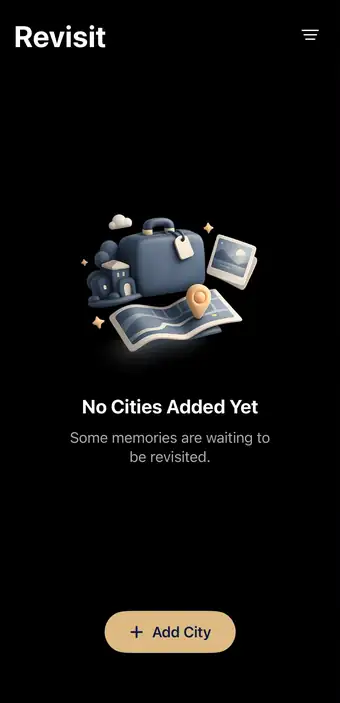
Start with a city
The home screen is a list of cities, each on its own map card. When it’s empty, a friendly prompt invites you to add the first one.
02
Save places by category
Every spot goes into one of four categories: cute cafés, veg food, hidden gems or shopping. Pick one, add a photo and a note, and it’s saved.
03
Share it as a guide
A city turns into a PDF travel guide with a map, the saved places and QR codes to navigate, ready to send to a friend.
04
Keep a memory
Revisit can turn a trip’s places into a small memory card that you can save or share.
Key decisions
Small app, clear choices.
With no team to lean on, every choice had to make the app simpler to use and simpler to build.


Decision 01
No account, ever
There’s no sign‑up or login. Places are saved on the phone, so you can start adding them the moment you open the app, and nothing is tracked.
Decision 02
Categories from real trips
The four categories come from what I kept looking for while travelling. Veg food gets its own, because it’s the hardest thing to find abroad.
Decision 03
Empty states with a voice
Empty screens say what belongs there in a friendly line, like the veg tab: “When you finally find proper veg food abroad, it deserves respect.”
How I built it
One person, one month.
I designed the screens and wrote the app myself in SwiftUI, using AI tools to move faster on code, then took it through App Store review.
Design
Flows, screens and App Store assets
Build
SwiftUI, with AI tools for code and debugging
Data
Saved on the device. No server, no account
Pricing
One‑time download, no subscription
Launch
Live on the App Store since 12 Feb 2026
Principles
What I held on to.
No login
Open the app and start saving straight away
On device
Your places never leave your phone
Offline ready
Works without a connection while you travel
Simple
Cities, places, guides and memories. Nothing more
Revisit has been live on the App Store since 12 February 2026.
Looking back
Designing and building Revisit myself meant every screen I drew was one I had to build. That kept the app small and focused. It also showed me how much faster an idea moves when the person designing it can ship it.
Vishal Thakur · Product designer